Codex usage limits: where to check them, and what 1% of your week buys
Where to check Codex usage limits in ChatGPT and the CLI, and what 1% of a Plus week buys at API prices, measured from six months of my own Codex logs.
You can check your Codex usage in two places. In ChatGPT, open Settings → Usage (chatgpt.com/settings/usage). In the Codex CLI, type /status. Both show the same meter: the percentage left of your weekly limit, a 5-hour bar if your plan has one right now, when each resets, and your credit balance.
Neither tells you what 100% is. OpenAI doesn't publish the limit in tokens or dollars, and it has changed the rules around that bar several times in 2026, so I measured it from my own Codex logs. As of October 2026, 1% of my ChatGPT Plus week buys somewhere between $4.50 and $9 of work at API prices, most likely close to $9. From May to early September the same 1% bought about $1, so a Plus week went from roughly $100 of API-priced work to something like $450 to $900, and I can't find an announcement that explains it.
Where to check your Codex usage limits
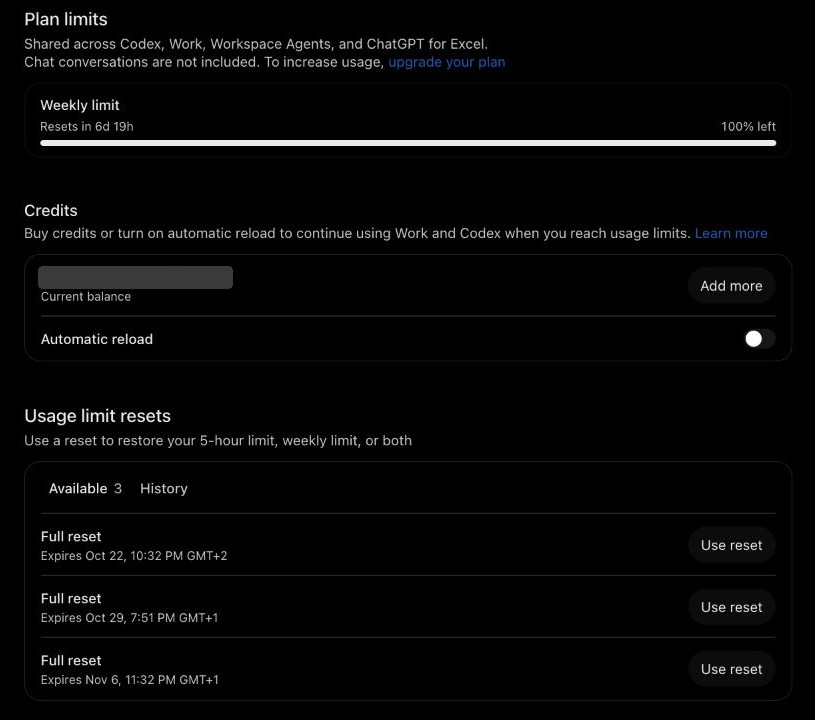
The web page is the fullest view. The Overview tab has the plan bars, your credits and any banked resets, and Analytics keeps each past week's percentage along with which features used it. The same bar covers ChatGPT Work and the Excel add-in, so anything you run there comes out of your Codex week. Older guides link to chatgpt.com/codex/settings/usage, which now just lands on the ChatGPT home page.
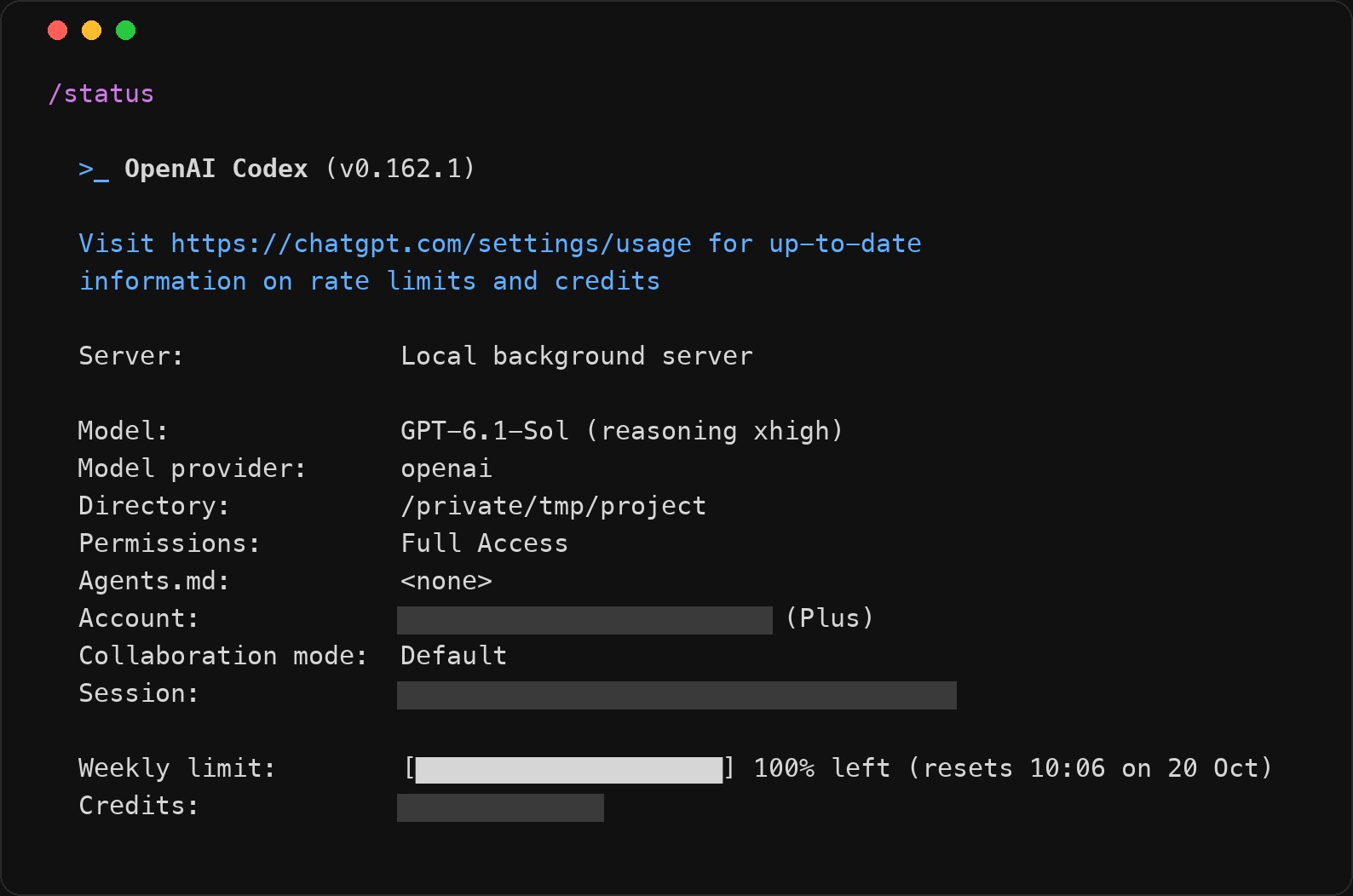
In the CLI, /status prints the same bars with exact reset times. If it answers "refresh requested", run it again a few seconds later. /usage opens the same history as the web page and is where you redeem a banked reset. The desktop app keeps it all under Usage & Billing.
Banked resets are worth checking for. OpenAI hands them out as promotions, and each one expires 30 days after it arrives. Using one refills the bars and restarts your week from that point, so save it for a week you've actually run dry.
What 1% of the weekly limit buys
Codex logs the meter for you. Each time it records token usage in ~/.codex/sessions, it also writes down the percentage used of every window and when that window resets. Group the events by weekly window, add up the work, divide by how far the bar moved, and you have a price for 1%. My logs are mostly Plus, with a few weeks each on Pro $100 and Pro $200.
I price that work at OpenAI's API list rates, because that's how the meter seems to count (more on that below). Raw tokens are a poor unit: 95% of my input tokens are cache reads, which cost a tenth as much, so a token count says more about your cache hit rate than about your allowance.
What 1% of the weekly limit bought, at API prices
Show the numbers
| Week from | Plan | Model | Used | $ per 1% | Tokens per 1% |
|---|---|---|---|---|---|
| Apr 27 | Plus | GPT-5.5 | 15% | $1.20 | 1.92M |
| Apr 28 | Plus | GPT-5.5 | 19% | $1.18 | 1.57M |
| May 31 | Plus | GPT-5.5 | 32% | $1.34 | 1.72M |
| Jun 4 | Plus | GPT-5.5 | 37% | $1.46 | 1.45M |
| Jun 12 | Plus | GPT-5.5 | 36% | $1.13 | 0.90M |
| Jun 18 | Plus | GPT-5.5 | 49% | $1.81 | 2.29M |
| Jun 25 | Plus | GPT-5.5 | 37% | $1.26 | 1.30M |
| Jul 10 | Plus | GPT-5.5 | 17% | $0.82 | 0.40M |
| Jul 11 | Pro $100 | GPT-5.6 Sol | 24% | $5.60 | 9.13M |
| Jul 12 | Pro $100 | GPT-5.6 Sol | 21% | $7.92 | 13.15M |
| Jul 14 | Pro $100 | GPT-5.6 Sol | 29% | $6.44 | 11.95M |
| Jul 18 | Pro $100 | GPT-5.6 Sol | 21% | $4.00 | 10.06M |
| Jul 21 | Pro $100 | GPT-5.6 Sol | 32% | $3.70 | 9.10M |
| Aug 11 | Plus | GPT-5.6 Sol | 45% | $1.03 | 1.62M |
| Aug 14 | Plus | GPT-5.6 Sol | 81% | $1.03 | 1.65M |
| Aug 21 | Plus | GPT-5.6 Sol | 91% | $0.63 | 0.79M |
| Aug 26 | Plus | GPT-5.6 Sol | 18% | $1.04 | 1.38M |
| Aug 31 | Plus | GPT-5.6 Sol | 45% | $0.97 | 1.49M |
| Sep 5 | Pro $100 | GPT-6 Astra, mostly Fast | 45% | $3.52 | 0.99M |
| Sep 8 | Pro $200 | GPT-6 Astra | 90% | $10.33 | 5.18M |
| Sep 12 | Pro $200 | GPT-6 Astra | 95% | $5.12 | 3.63M |
| Sep 19 | Pro $200 | GPT-6 Astra + GPT-5.6 Sol | 45% | $14.42 | 15.15M |
| Sep 26 | Pro $200 | GPT-6.1 Sol + GPT-6 Astra, half Fast | 17% | $10.03 | 17.94M |
| Oct 13 | Plus | GPT-6.1 Sol, one day, one tick | 1% | $4.56 to $9.12 | 7.8M to 15.5M |
Through early September, Plus barely moved. 1% bought about $1.20 of API-priced work on GPT-5.5 in May and June, and about $1 on GPT-5.6 Sol in August and early September, roughly 1.5 million tokens of my kind of work either way. A Plus week was worth around $100 at API rates.
October broke the pattern. On October 13 I ran a batch of small GPT-6.1 Sol tasks on Plus, the Codex side of my Codex vs Claude Code test, and the weekly bar went from 0% to 1% after $4.56 of work, about 7.8 million tokens. It was still at 1% after $4.87. The bar only shows whole percentages, and in every earlier week I could check, the first tick came after about half a percent of real use, so it rounds rather than cutting off. That makes the $4.56 half a percent and a full 1% about $9. If it only ticked at a full 1%, the answer is $4.56. At either end, 1% now buys four to nine times what it did in August.
The cause is unclear. DevDay on September 29 changed Pro, not Plus, and OpenAI's docs still describe the same Plus limits. Either the Plus week got bigger, or GPT-6.1 Sol counts for less on the meter than its price suggests, and one model on one day can't settle which. This account also came back to Plus from Pro in early October, and I can't rule out that it's on something other than a standard Plus allowance. October is a first reading, so check your own logs before you decide Plus is too small.
The Pro numbers come from fewer weeks and wander more. On Pro $100 in July, 1% bought $5.50 to $8 at first and slid to about $4 a week later, on the same model. On Pro $200 in September it bought $5 to $14, so a full week was worth somewhere between $500 and $1,400.
The meter counts what your tokens would cost on the API
Once you pass your limit, Codex charges credits per million tokens, and for every model on OpenAI's rate card the credit price is the API list price times 25. GPT-6.1 Sol costs $2 per million input tokens on the API and 50 credits in Codex; GPT-6 Astra costs $10 and 250.
The included allowance seems to follow the same price list. I split my Plus 5-hour windows on GPT-5.6 Sol into small steps of the bar and fit how much each kind of token moved it.
How much one token moved the 5-hour bar, relative to one fresh input token
| Token type | Measured on the meter | GPT-5.6 Sol API price |
|---|---|---|
| Fresh input | 1 | 1 ($4 per million) |
| Cached input | 0.09 | 0.10 ($0.40) |
| Output | 4.7 | 5 ($20) |
A cached token moved the bar about a tenth as much as a fresh one, and an output token about five times as much. Those are GPT-5.6 Sol's API price ratios. In August, 1% of a Plus week was about 25 credits; my October reading puts it between 114 and 228, which on GPT-6.1 Sol was 8 to 16 million tokens of my test runs. I've only measured this on one model, but if the bar prices every model the same way, the model you pick matters as much as the plan. GPT-6 Astra costs five to ten times as much per token as GPT-6.1 Sol, so the same work would drain your week five to ten times faster.
Speed costs extra too. Fast mode spends allowance at 2.5 times the normal rate and Ultrafast at 8 times. Fast is easy to leave on by accident; I found it switched on in my own CLI config.
Long threads are the other quiet drain. Every turn re-reads the whole conversation, so even at a tenth of the price, cache reads were more than half of what my sessions cost on GPT-5.6 Sol. Starting a fresh thread for a new task is the cheapest habit there is.
When there's a 5-hour window, it's a sixth of your week
Whenever my Plus account had a 5-hour bar, the two bars moved together, and the ratio between them barely changed all year.
One full 5-hour window used about 16% of a Plus week
So with a 5-hour bar in place, you can max out about six windows a week, and a seventh runs into the weekly wall. The 5-hour window only paces you; it adds nothing to the week.
It's also the part OpenAI keeps changing. The 5-hour window was removed for paid plans on July 12 and came back for Plus on August 25, while Pro stayed exempt. When I checked on October 13, my Plus account didn't show one. When it disappeared in July, a common complaint was that OpenAI had shrunk the week to the old 5-hour size. My numbers don't show that: in mid-August, with no 5-hour window, 1% of the week bought the same $1 it bought after the window came back.
Pro plans and the October 29 change
Pro comes in three tiers, $100, $200 and $500, and OpenAI's pricing page describes them only as "Standard usage", "More usage" and "Maximum power". Only Pro $500 gets Ultrafast, and neither Pro tier I used had a 5-hour bar after July.
Pro $200 is the one changing. Anyone subscribed between September 22 and the DevDay announcement on September 29 keeps the old allowance through October 29, then drops to a lower one at the same price. OpenAI hasn't published the new size; the figure going around is half, 10 times Plus instead of 20. My Pro $200 weeks in September, on the old allowance, were already 5 to 14 times my summer Plus weeks rather than 20, and my single October Plus reading already lands inside that range. Those were different months on different models, so it isn't a precise ratio, but I'd check what your own 1% buys before paying 10 times the price for a multiple nobody prints.
Is Codex free?
Only in a small way. Free and Go ($8) accounts get GPT-6 Luna in the desktop app, and even that is still rolling out. When I tried the free tier back in April, the whole week was gone within a day. Plus is the real starting point. Past your limit you can buy credits, priced on the same rate card, or sign Codex in with an API key and pay API rates directly.
Measure what your 1% buys
This reads your session logs and prints, for each weekly window, how far the bar moved and what each 1% bought. It only looks at token counts and meter readings, and nothing leaves your machine. Models missing from the rate table count as $0, so add a row for anything else you run. It also ignores Fast mode, so Fast-heavy weeks come out low.
import glob, json, os
from collections import defaultdict

# Codex rate card: credits per 1M tokens (input, cached input, output). 25 credits = $1 at API prices.
RATES = {"gpt-6.1-sol": (50, 2.5, 250), "gpt-6-astra": (250, 25, 1250), "gpt-6-luna": (2.5, 0.25, 12.5),
         "gpt-5.6-sol": (100, 10, 500), "gpt-5.6-luna": (5, 0.5, 30), "gpt-5.5": (125, 12.5, 750)}
weeks = defaultdict(lambda: {"used": 0, "tokens": 0, "credits": 0.0, "start": None, "plan": None})

for path in sorted(glob.glob(os.path.expanduser("~/.codex/sessions/**/*.jsonl"), recursive=True)):
    model, prev = None, None
    for line in open(path, errors="ignore"):
        if '"turn_context"' not in line[:120] and '"token_count"' not in line[:200]:
            continue
        e = json.loads(line); p = e["payload"]
        if e["type"] == "turn_context":
            model = p.get("model", model); continue
        if p.get("type") != "token_count" or not p.get("info"):
            continue
        t = p["info"]["total_token_usage"]
        cur = (t["input_tokens"], t["cached_input_tokens"], t["output_tokens"])
        d = [c - q for c, q in zip(cur, prev)] if prev and cur[0] >= prev[0] else cur
        prev = cur
        rl = p.get("rate_limits") or {}
        wk = next((w for w in (rl.get("primary"), rl.get("secondary")) if w and w["window_minutes"] == 10080), None)
        if not wk:
            continue
        w = weeks[wk["resets_at"] // 600]
        r = RATES.get(model, (0, 0, 0))
        w["used"] = max(w["used"], wk["used_percent"]); w["tokens"] += d[0] + d[2]
        w["credits"] += ((d[0] - d[1]) * r[0] + d[1] * r[1] + d[2] * r[2]) / 1e6
        w["start"] = w["start"] or e["timestamp"][:10]; w["plan"] = rl.get("plan_type") or "?"

for w in sorted(weeks.values(), key=lambda w: w["start"]):
    if w["used"] >= 10:
        print(f'{w["start"]}  {w["plan"]:<8} {w["used"]:>4.0f}% used  '
              f'{w["tokens"] / w["used"] / 1e6:5.2f}M tokens per 1%  ${w["credits"] / 25 / w["used"]:5.2f} per 1%')
If you'd rather price a single session by hand, our token price calculator has current OpenAI rates.
OpenAI can resize 100% whenever it likes, and in 2026 it has, more than once and in both directions. The logs on your disk record every reading of the meter, which makes them the only receipt you'll get. Look at what 1% bought you last month before deciding the plan above yours is worth it.
More from the Blog
Claude Code Pricing: What a $200 Max Plan Holds at API Prices
Claude Code pricing runs $20 to $200 a month. I measured one Max 20x window at about $300 of Opus 5.5 work at API prices, and a week at about ten windows.
Social Media API Costs in 2026: LurkAPI vs Alternatives
Compare social media API costs for LurkAPI, ScrapeCreators, TwitterAPI.io, and X, with billing units, prepaid pack prices, and practical workload examples.