AI video detectors only guess. Here's how to tell if a video is AI
An AI video detector can only guess. The label inside the file is proof, but every re-save I tried stripped it. Plus the visual tells that still work.
The reliable way to tell if a video is AI is to check the file, not the picture. The two Google video models I tried, Veo 3.1 Lite and Gemini Omni 1.1 Flash, each wrote a signed label into the clip, naming Google as the maker and saying a SynthID watermark was applied. A clip that still carries a label like that is AI. An AI video detector, the kind that says a clip is "87% likely AI", has no such evidence. It's guessing from how the frames look, and I didn't run any for this post. The label is the part you can check yourself, so that's what I tested.
But the label rarely reaches you. In October 2026 I put three clips, one each from Veo, Omni and Kling 3.0, through five everyday edits. All three originals carried a label. None of the 15 edited copies did, including the ones where not a single frame changed. So a missing label tells you nothing, and without one you're left with a few visual tells and a detector score that counts as a weak hint.
Why an AI video detector can only guess
A detector is a classifier. It's trained on a pile of AI clips and a pile of real ones, learns whatever separates them (texture, noise, how motion smears between frames, the fingerprints of particular models) and scores your clip by which pile it resembles. New video models ship every few weeks and it only knows the ones it was trained on, and the fine detail it keys on is exactly what a platform's re-encode smooths over.
Independent testing agrees. When researchers ran open-source detectors on deepfakes actually circulating online in 2024, their accuracy score on video fell by about half compared with academic test sets. Commercial detectors did better but still trailed trained human analysts. A high score is a hint, and a low one means less than it looks: "likely real" on a clip from a model the detector has never seen just means it doesn't recognize the style. Music detectors fail the same way, which I measured in a test of three of them.
What the AI label inside a video says
Both Google clips carried a C2PA manifest, also called Content Credentials, inside the MP4. It's signed by Google LLC and records two steps: "Created by Google Generative AI" and "Applied imperceptible SynthID watermark." The signature covers the video itself, so nobody can edit the clip, or move the label onto another one, without breaking it. That's about as close to proof as a video gets.
Kling's clip had no C2PA. It carried a plain-text AIGC tag in its metadata naming Kling as the producer, the hidden label China has required on AI content since September 2025. Nothing signs it, so anyone can type one into a real video or delete it from a fake. Treat it as a claim.
One re-save strips the label, even when no frame changes
The edits were the ones a video goes through all the time: a remux (a new MP4 with the same audio and video, which is what converters and many "save as" dialogs do), a trim to the first three seconds without re-encoding, Apple's built-in 720p export, a standard H.264 re-encode, and a screen recording of the clip playing in Chrome.
Was the AI label still in the file?
| Clip | Original | Remux | Trim | Apple export | Re-encode | Screen recording |
|---|---|---|---|---|---|---|
| Veo 3.1 LiteC2PA, signed by Google | Label | Gonesame frames | Gonesame frames | Gonesame frames | Gone | Gone |
| Gemini Omni 1.1 FlashC2PA, signed by Google | Label | Gonesame frames | Gonesame frames | Gonesame frames | Gone | Gone |
| Kling 3.0 TurboAIGC text tag, unsigned | Label | Gonesame frames | Gonesame frames | Gone | Gone | Gone |
The re-encode and the screen recording were always going to lose it, because they make a new video and the signature covers the old one. The other three are the surprise. On the Google clips, the remux and Apple's export kept the video byte for byte as Google made it, the trim kept its first three seconds the same way, and all three came out unlabeled.
The label lives in a box of its own. An MP4 is a stack of boxes: one holds the video and audio, another the index, and C2PA adds one beside them. ffmpeg and Apple's exporter write a fresh file with the boxes they know, and C2PA's isn't one of them. Kling's text tag went the same way. I ran the same test on AI images and got the same answer.
Every major platform re-encodes what you upload, so by the time a clip reaches your feed its label is almost certainly gone, AI or not. Google's label also says a SynthID watermark was applied. I didn't test whether that survives these edits, so I can't tell you it gives you a second chance.
Which visual tells still work in late 2026
The old checklist mostly failed on my clips:
- Garbled text. Veo wrote "PEACHES $3/LB" in chalk and kept it perfect for all eight seconds.
- Numbers that don't move right. Omni's doorbell timestamp counted from 23:41:07 to 23:41:12 in five seconds, right on time.
- Mangled hands. The vendor and the customer in the Veo clip pass cash back and forth with normal-looking hands.
- A watermark in the corner. None of the three files had one, so its absence proves nothing.
Two tells held up. The small print. The sign the prompt asked for came out perfect. The text nobody asked for didn't. Look past the headline sign to the price cards, menus and shelf labels around it.
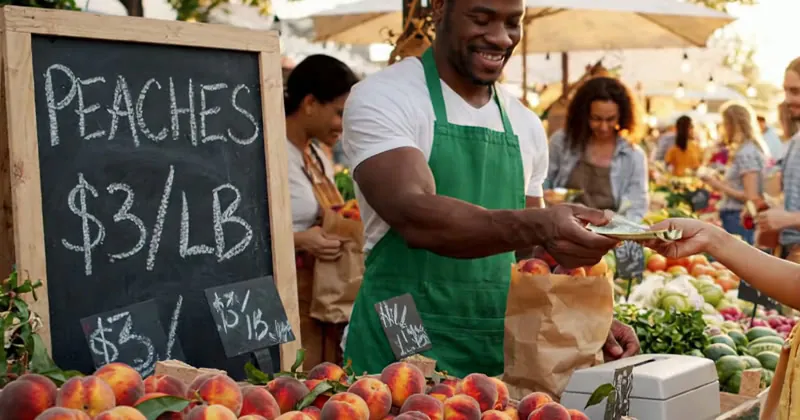
- 1The sign the prompt asked for. Spelled right, and it stays right in every frame.
- 2The price cards nobody asked for: chalk scribbles shaped like prices.
What changes across a cut. Each shot in a generated clip is consistent with itself, but the join between shots is where the world gets redrawn. Kling cut from a wide shot to a close-up on its own, and the surface under the bottle changed. It's the perfume clip from the Kling pricing post.
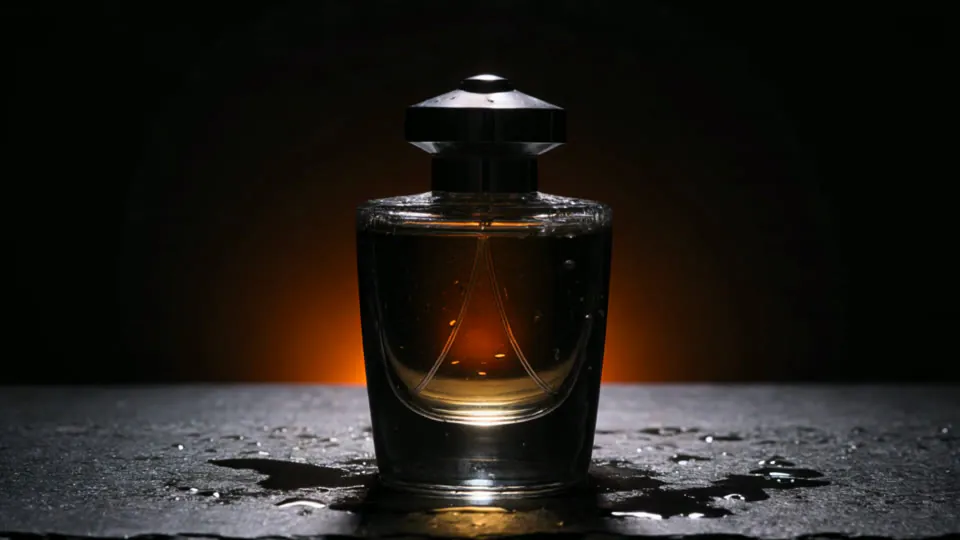 2.40 s
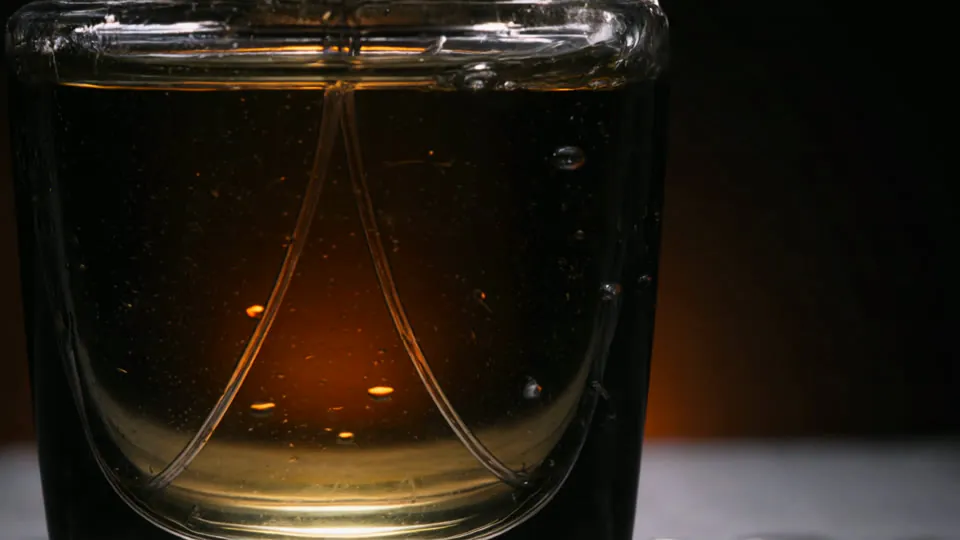 2.50 s
- 1Before Kling's cut, the bottle stands on wet black slate.
- 2A tenth of a second later, the surface is dry and pale grey.
Shot length doesn't help much anymore either, since Omni can extend a single shot to 40 seconds.
The doorbell clip gave me nothing I'd bet on. The raccoon's motion, its shadow and the box all held up, and low resolution, a fisheye lens and night-vision grain hide exactly the details you'd check. Doorbell and CCTV-style clips are the format I'd trust least.
What I'd do with a clip someone sent me
Find the earliest upload you can, and the original file if anyone shared it, and check that for a label. A copy that came through an app tells you nothing either way. If there's no label, check the small print and the cuts, and count a detector score as one weak vote. Then look for a second camera: real events get filmed by more than one phone, and those clips often surface fast, while a fake has a single recording and nothing to line it up against.
More from the Blog
The best realistic AI image generator, judged on 12 photos built to trip it up
The best realistic AI image generator costs about 4 cents: GPT Image 2.5 on high and Nano Banana 2.1 passed 11 of 12 photo tests. Max only helps close-ups.
Claude Code Alternatives: OpenCode With DeepSeek, GLM, Kimi and Qwen, Priced per Task
Claude Code alternatives, priced per finished task: OpenCode with DeepSeek cost about a cent, GLM-5.3 cost what Sonnet did, and the host set the bill.